Note (September 2026): This review has been updated: the old $49 price is out of date, and an earlier claim that the software has no drawbacks has been corrected. Features, platforms and pricing now reflect the developer’s product page as of September 2026.
DVDFab DVD Ripper is paid Windows and Mac software from DVDFab that converts DVDs, ISO files and VIDEO_TS folders into digital files such as MP4, MKV and MP3. As of September 2026, the developer lists over 1,000 output formats, more than 260 device presets, GPU acceleration and a 30-day full-function free trial. Ripping copy-protected discs is restricted by law in some countries, including the United States.
Key Takeaways
- DVDFab DVD Ripper is still sold under that name in September 2026 as part of the DVDFab 13 suite; the product page showed a last update of September 22, 2026.
- The developer lists support for over 1,000 video and audio formats, codecs including H.264, H.265, MPEG-4 and AV1, and over 260 device preset profiles.
- A 30-day full-function trial is offered; as of September 2026 the product page showed a Buy Now price of US$59.49. Prices change, so check before buying.
- GPU acceleration covers NVIDIA CUDA/NVENC, AMD AMF, Intel Quick Sync Video and, on macOS, VideoToolbox.
- In the United States, 17 U.S.C. Section 1201 bars circumventing copy protection, so ripping commercial encrypted DVDs carries legal risk even for personal use.
Have you ever thought of watching your favorite movies on different devices other than the DVD players? Ever thought of watching them in other file formats including WMV, MP4, FLV, AVI, etc.? If yes, then do you know that you need DVD ripper software for the same? YES. You need the one. One long-running commercial option is DVDFab DVD Ripper.
DVDFab DVD Ripper Software for Windows
This software helps in ripping DVDs and converting them to different file formats which are supported by other devices. The other devices include media players, mobile phones, Xbox, iOS devices, PS3 and much more.
DVDs may seem old-school now, yet many people still keep favorite TV shows, family videos and movies on them. But discs can break, get lost or become scratched, and a damaged disc may no longer play.
So, many people wonder why they cannot simply copy the DVD files onto their computers. On a DVD-Video disc, movies and TV episodes are stored as VOB files inside a VIDEO_TS folder, and commercial discs are often encrypted, so the files cannot simply be copied and played on phones, tablets or TVs. That is why DVD ripper software is used to convert the disc’s video into popular file formats such as MP4 or MKV.
Features of DVDFab DVD Ripper
- Simple and user-friendly interface
- Rips and converts the DVDs
- Fast conversion to other file formats
- Rip DVDs in all popular file formats
- Over 260 device preset profiles (as listed by the developer in September 2026)
The sections below outline the key features of DVDFab DVD Ripper, checked against the developer’s product page as of September 2026.

Ripping to Different Formats
DVDFab DVD Ripper converts DVDs to many formats, including WMV, MP4 (up to 4K profiles), FLV, MKV and AVI; as of September 2026 the developer says it supports over 1,000 video and audio formats using codecs such as H.264, H.265, MPEG-4 and AV1. It doesn’t only help in ripping to video formats, but even in audio formats as well including DTS, MP3, WAV, MP4, WMA, and others.
It can also output 3D video: earlier versions listed 3D AVI, 3D M2TS, 3D MKV, 3D MP4, 3D TS and 3D WMV profiles, and the current product page lists 3D among its Profile Filter options alongside Passthrough, 4K/5K/8K, H265 and 10/12-bit. No matter whether you have a normal device or a 4K or 3D device, DVDFab DVD ripper software has everything covered under it for all the users.
Preset profiles for Various Devices
If you don’t have any idea about the file format, then DVDFab DVD ripper software offers preset profiles for all the devices and you can choose from the same. This particularly means that you can easily select the device for storing the files which will be converted by the software without any hassles of selecting the file formats.
Fast and Controlled Conversion
DVDFab DVD Ripper doesn’t only bring the preset profiles and the file formats, but it even brings in a fast and controlled conversion too. It does allow the user to choose the start and end segments from the videos. It means that you can keep a particular video segment with you. Also, it does allow to choose the channel, bit rate, volume, frame rate, aspect ratio and DE interlacing.
Not only this, this DVD Ripper software even brings in the real time updates with different values and file size. Even the user can change the play region using the custom cropping or auto crop tool as well as reset the frame resolution too.
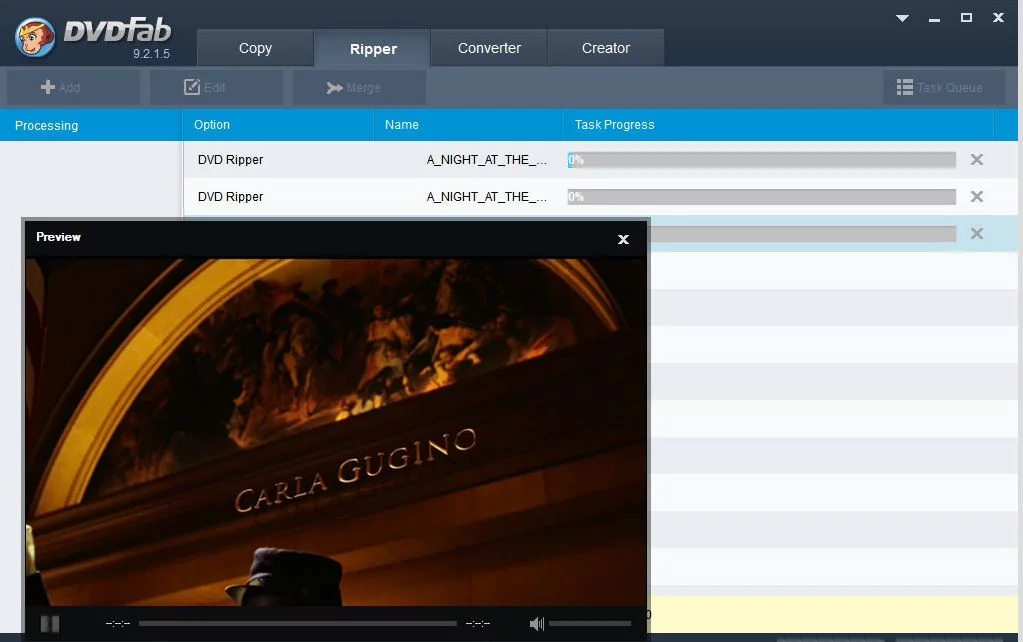
Apart from these, DVDFab DVD Ripper helps the user with the batch conversion. It significantly means that the user doesn’t have to rip the files one by one. Even the user can rip a single file with different profiles at one go. Other features include customizable UI, a preview of the conversions, supports latest multi-core chipsets and much more.
Pricing and Availability
DVDFab DVD Ripper is available for Mac and for Windows 11/10 (64-bit). It is available as a 30-day full-function free trial. You can check out all the features it offers in the trial period. After the trial, the full version is paid; as of September 2026 the developer’s product page showed a Buy Now price of US$59.49. Prices and license terms change, so check the official page before buying. The software can be downloaded from their official website.
After installing DVDFab DVD ripper software, it offers the users with a number of tools and products including DVD ripping. If you really want to have powerful and amazing ripping software, then it is the one to try. When you launch the application, you need to insert the DVD which needs to rip.
All the DVD files will be automatically scanned after inserting the DVD. You just have to click on output in order to select the desired file format. All the files will be converted and saved to a default location or you can even choose a specific location from the drop down menu. Click on Start to start the ripping process.
Verdict
Overall, the DVDFab DVD ripper is simple, easy to use software with a customizable and streamlined interface. In terms of speed, the developer says a DVD can be ripped in as little as 5 minutes; actual times depend on the disc, the output format and the computer’s hardware. But sometimes it does take a little time while converting to formats like H265 format.
A key strength is GPU hardware acceleration: as of September 2026 the developer lists NVIDIA CUDA/NVENC, AMD AMF, Intel Quick Sync Video and, on macOS, VideoToolbox.
DVDFab DVD Ripper offers a plethora of files formats with device profiles. It is feature-rich ripper software which is simple and easy to use. It does have drawbacks: the developer lists a live internet connection as a system requirement, the full version is paid after the trial, and ripping copy-protected discs raises legal issues in some countries (see below). For buyers who want a paid all-in-one ripper with device presets, DVDFab is a strong candidate; free tools such as HandBrake cover basic conversion of unprotected discs. It helps in ripping DVDs easily and offers a plethora of options.
When you try out this software, don’t forget to share your reviews with us in the comment section below. 🙂
What Is DVDFab DVD Ripper?
DVDFab DVD Ripper is a DVD-to-digital converter sold by DVDFab as one module of its DVDFab 13 software suite. It reads a disc, extracts the video, audio and subtitle tracks, and re-encodes them into a file that plays on computers, phones, tablets, game consoles and smart TVs.
According to the developer’s product page (September 2026), DVDFab DVD Ripper accepts physical DVD-5, DVD-9, DVD±R, DVD±RW, DVD-RAM and DVD-R DL discs, as well as ISO image files and VIDEO_TS folders. The same page showed a last update of September 22, 2026, so the product is still actively maintained under the same name.
DVDFab DVD Ripper Specifications at a Glance
| Item | Details (developer’s product page, September 2026) |
|---|---|
| Platforms | Windows 11/10 (64-bit) and macOS |
| Sources | DVD-5, DVD-9, DVD±R, DVD±RW, DVD-RAM, DVD-R DL, ISO files, VIDEO_TS folders |
| Output | Over 1,000 video and audio formats, including MP4, MKV, AVI, MP3, WAV and FLAC |
| Codecs | H.264, H.265, MPEG-4, AV1 |
| Device presets | Over 260 profiles for brands such as Apple, Google, Huawei, Microsoft, Samsung, Sony and LG |
| Hardware acceleration | NVIDIA CUDA/NVENC, AMD AMF, Intel Quick Sync Video, VideoToolbox on macOS |
| Built-in editor | Crop, trim, merge, image/text watermark, external SRT/ASS subtitles, brightness/contrast/saturation |
| Windows requirements | Intel i3 or higher, 4 GB RAM or more, 20 GB free disk space, a DVD drive, live internet connection |
| Trial | 30-day full-function free trial |
| Price | Buy Now price shown as US$59.49 in September 2026; prices change |
The developer’s pages list different minimum macOS versions in different places, so Mac users should confirm the current requirement on the official download page before buying.
What Is New in the Current Version?
Compared with the version reviewed above, the current DVDFab DVD Ripper adds a built-in editor and AI-assisted options. According to the developer, the ripper works with NVIDIA AI Enhancer to convert SDR video to HDR10 on Windows PCs, and a “Video Upscaler AI” option can upscale video by 300%.
The developer also says the software handles homemade and commercial DVDs protected by schemes such as CSS, APS, RC, RCE, Sony ARccOS, UOPs and RipGuard, supported by a cloud decryption service that receives over 40 updates per year. That capability is exactly what raises the legal questions covered below.
How to Rip a DVD With DVDFab DVD Ripper
Ripping a DVD with DVDFab DVD Ripper takes a few steps, based on the developer’s own guide:
- Launch DVDFab 13 and select the Ripper option.
- Load the source: insert the DVD, or use the Add button; ISO files and folders can be dragged onto the workspace.
- Choose a profile: pick an output format such as MP4 or MKV, or a device preset, and use Advanced Settings for codec, frame rate, resolution, quality and subtitles.
- Edit if needed: crop, trim, merge clips or add external subtitles.
- Pick the save location on a hard drive or mobile device, then click Start.
If a ripped MP4 file later refuses to open, see this guide to repairing corrupt MP4 videos.
Is It Legal to Rip DVDs With DVDFab?
Whether ripping a DVD is legal depends on the country and on whether the disc is copy-protected. DVDFab’s own FAQ says that personal ripping of your own DVDs is generally allowed but that backing up copy-protected commercial discs for commercial sharing is illegal, and it tells users to follow local copyright rules. This article does not give legal advice; check the law where you live.
United States
Section 1201 of the US Copyright Act (17 U.S.C. 1201) states that no person shall circumvent a technological measure that effectively controls access to a copyrighted work, and it defines circumvention to include decrypting an encrypted work without the copyright owner’s authority. It also bans trafficking in tools primarily designed for circumvention. The US Copyright Office grants limited exemptions through a rulemaking every three years; its most recent completed cycle produced the 2024 Final Rule, published October 28, 2024.
United Kingdom and European Union
According to Wikipedia’s summary of ripping law, the UK introduced a private-copying exception in 2014, but the High Court overturned it in 2015, so private copying is again unlawful there. In the European Union, member states may allow a private-copy exception paired with compensation schemes such as levies on copying devices; making copies for other people is not covered.
Ripping home videos you recorded yourself, or unprotected discs you hold the rights to, avoids these problems.
DVDFab DVD Ripper vs HandBrake vs MakeMKV
| Tool | Price (September 2026) | Platforms | Output | Copy protection |
|---|---|---|---|---|
| DVDFab DVD Ripper | Paid after 30-day trial (US$59.49 Buy Now price shown) | Windows, macOS | 1,000+ formats, 260+ device presets | Developer says it handles CSS and other schemes |
| HandBrake | Free, open source (GPL-2.0) | Windows, macOS, Linux | Transcodes video files | Does not circumvent copy protection |
| MakeMKV | DVD functions free; Blu-ray features free during beta | Windows, macOS, Linux | MKV only | Converts encrypted discs to MKV |
HandBrake’s latest stable release listed on Wikipedia in September 2026 is version 1.11.2, released June 7, 2026. For a deeper head-to-head, read HandBrake or WinX DVD Ripper: which is the best way to rip DVDs, and for full-disc backups rather than conversion, see the top DVD copy software for Windows and Mac.
DVDFab DVD Ripper Pros and Cons
Pros
- Very wide format support, with more than 260 device presets.
- GPU acceleration on NVIDIA, AMD and Intel hardware, plus VideoToolbox on Mac.
- Built-in editor for cropping, trimming, merging and subtitles.
- Actively updated; the product page showed an update on September 22, 2026.
- A 30-day full-function trial lets users test it before paying.
Cons
- Paid software, while HandBrake and MakeMKV’s DVD features are free.
- The developer lists a live internet connection as a requirement.
- Ripping copy-protected discs is restricted in the US, the UK and elsewhere.
- Windows support is limited to 64-bit Windows 11 and 10.
Who Should Use DVDFab DVD Ripper?
DVDFab DVD Ripper suits people digitizing a large collection of their own discs who want device presets, batch conversion and GPU speed in one paid tool. Users who only need to convert a few unprotected discs can start with a free transcoder such as HandBrake, and anyone who mainly wants to watch the result can play MP4 and MKV files in a media player such as VLC; see these VLC media player keyboard shortcuts. For a lighter job, such as turning a VOB file into MP4, a dedicated converter like the WinX free VOB to MP4 converter may be enough.
Frequently Asked Questions
Is DVDFab DVD Ripper free?
DVDFab DVD Ripper is not free long term. The developer offers a 30-day full-function free trial, after which a paid license is needed; as of September 2026 the product page showed a Buy Now price of US$59.49, and prices change.
Does DVDFab DVD Ripper work on Mac?
Yes. DVDFab offers DVD Ripper for both macOS and Windows 11/10 (64-bit). On Macs it can use VideoToolbox for hardware acceleration; check the official download page for the current minimum macOS version.
Can DVDFab rip copy-protected DVDs?
The developer says DVDFab DVD Ripper handles DVDs protected by CSS, APS, RC, RCE, Sony ARccOS, UOPs and RipGuard. In the United States, 17 U.S.C. Section 1201 prohibits circumventing such protection without the copyright owner’s authority, so check the law in your country first.
What formats can DVDFab DVD Ripper convert to?
DVDFab DVD Ripper converts DVDs to over 1,000 video and audio formats, according to the developer, including MP4, MKV, AVI, MP3, WAV and FLAC, with codecs such as H.264, H.265, MPEG-4 and AV1.
What is a free alternative to DVDFab DVD Ripper?
HandBrake is a free, open-source transcoder for Windows, macOS and Linux, but it does not circumvent copy protection. MakeMKV converts discs to MKV and says its DVD functions are free and will always stay free.
Does DVDFab DVD Ripper need an internet connection?
Yes. The developer’s Windows system requirements list a live internet connection, alongside an Intel i3 or better processor, 4 GB of RAM, 20 GB of free disk space and a DVD drive.