Close Menu
JustwebworldJustwebworld
  • Astrology
  • Business & Finance
    • Cryptocurrency
    • Make Money
    • Entrepreneur
    • Brands
    • Companies
    • Personal Finance
      • Banking
      • Insurance
      • Trading and Investing
  • Tech
    • Computing
    • Cybersecurity
    • Electronics
    • Android
    • Apple
    • Gadgets
    • Social Media
    • Mobile Apps
    • Softwares
  • Education
    • Vocabulary
    • Abbreviations
    • General Knowledge
    • Writing & Translation
  • Lifestyle
    • Beauty & Cosmetics
    • Fashion & Style
    • Furniture & Decor
    • Luxury
    • People & Relationships
    • Pets and Animals
    • Shopping
    • Parenting
    • Gardening
    • Birthdays
  • Health
  • Travel
  • Auto
  • Gaming
  • Food
  • Entertainment
  • Sports
Facebook X (Twitter) Instagram Pinterest YouTube LinkedIn WhatsApp Telegram
Friday, February 13
  • About
  • Contact Us
  • Advertise With Us
  • Disclaimer
  • Terms & Conditions
  • Privacy Policy
JustwebworldJustwebworld
  • Astrology
  • Business & Finance
    • Cryptocurrency
    • Make Money
    • Entrepreneur
    • Brands
    • Companies
    • Personal Finance
      • Banking
      • Insurance
      • Trading and Investing
  • Tech
    • Computing
    • Cybersecurity
    • Electronics
    • Android
    • Apple
    • Gadgets
    • Social Media
    • Mobile Apps
    • Softwares
  • Education
    • Vocabulary
    • Abbreviations
    • General Knowledge
    • Writing & Translation
  • Lifestyle
    • Beauty & Cosmetics
    • Fashion & Style
    • Furniture & Decor
    • Luxury
    • People & Relationships
    • Pets and Animals
    • Shopping
    • Parenting
    • Gardening
    • Birthdays
  • Health
  • Travel
  • Auto
  • Gaming
  • Food
  • Entertainment
  • Sports
JustwebworldJustwebworld
Home » Internet » Top 10 Best Webinar Tips for Beginners

Top 10 Best Webinar Tips for Beginners

By Michael Austin Internet
Facebook Twitter LinkedIn Telegram Pinterest Reddit WhatsApp
Follow Us
WhatsApp Telegram

Everywhere you turn someone is running a webinar to promote his or her online business. Cool webinar tips for create and present a highly effective webinar.

You want to hop on the bandwagon, yet all the moving parts can be quite overwhelming…

  • Which platform provides the tools you need for successful webinar without costing an arm and a leg?
  • How to use the system and make sure everything runs smoothly?
  • How to get people to register and send them instruction to join the webinar?
  • When you’re presenting LIVE, how can you make sure the technology is working properly?

Table of Contents

Toggle
  • Successful Webinar Tips for Beginners
    • What Are Webinars?
    • Why Webinars?
    • How To Do Webinars?
    • How To Choose a Webinar System?
    • What Do You Need To Set Up a Webinar?
    • What Physical Equipment Is Needed To Run a Webinar?
    • How To Set Up Your Webinar Equipment?
    • When To Do Webinars?
    • How To Turn Webinars Into Online Courses?
    • How To Attract New Clients With Webinars?

Successful Webinar Tips for Beginners

Webinar Tips

The good news is, when you have the right guidance and information, it’s not that complicated:

What Are Webinars?

Webinars are online meetings in which you can get any number of people – from a few to a few hundreds or thousands – to listen to a presentation, watch a demonstration or participate in a Q & A session.

Why Webinars?

They’re a great way to promote your business when used as part of your online marketing strategy.

You can use webinars to promote your work and get new clients. Engage with your community and learn about their needs; or record a series of presentations to be used in an online course.

It’s also a great way to build your list, boost your social media presence and encourage interaction with your followers.

How To Do Webinars?

The first step is to choose a system. Most platforms are based on Google Hangout, with added functionalities specific to running webinars.

Also Read: Online Shopping Price Comparison, Coupons and Cashback Online Shopping Price Comparison, Coupons and Cashback

How To Choose a Webinar System?

Different platforms offer various features at different price points – find the one that fits your need. Here’re a few webinar software to look at.

  • ClickMeeting
  • Webinar Ally
  • Webinar Jam
  • Easy Webinar
  • Zoom
  • GoTo Webinar.

What Do You Need To Set Up a Webinar?
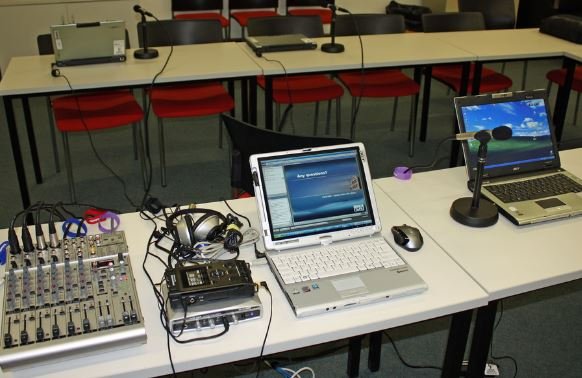
Set Up a Webinar

Here’re the basic set up:

1) A registration page, also called a landing page, linked to your email service provider so people can enter their information (e.g. email and name) to receive joining instructions.

2) An email service provider on which the data entered into the registration page is stored.

3) If you choose a system that comes as a WordPress plugin, you’d need a WordPress site set up.

4) A series of emails, e.g. thank you email, reminder emails and follow-up emails, to get as many people to watch you webinar as possible.

What Physical Equipment Is Needed To Run a Webinar?

Just a few basics will get you up and running:

  • A computer with a microphone.
  • A webcam if you plan on delivering part of your webinar as a “talking head.”
  • Good lighting – you can set up your computer in front of a window for natural light, or a lamp with a cool white daylight bulb to illuminate your face.
  • A stable Internet connection to make sure your broadcast is uninterrupted. Use an Ethernet cable to link your computer directly to a router if possible.

How To Set Up Your Webinar Equipment?

1) Find a quiet space where you won’t be disturbed. The room should allow you to set up a router so you can plug your computer into it with an Ethernet cable.

Also Read: 5 Available Tools for Downloading Files from Trackers 5 Available Tools for Downloading Files from Trackers

2) Set up a simple and tidy background for your presentation. A cluttered or messy background is unprofessional and can be distracting. A plain background tends to work better than a patterned backdrop.

3) Position your computer so it faces a window for natural lighting. If there’s not enough natural light, set up a lamp behind the computer screen for supplemental lighting.

When To Do Webinars?

The best timing to host your webinar depends on your audience’s schedule.

If you target stay-at-home moms, you may choose a time during school hours or in the evening after kids’ bedtime.

If your audience is in the corporate world, lunchtime or evening sessions could be best.

You also need to consider your audience’s time zone, to make sure timing works for the majority of your audience.

How To Turn Webinars Into Online Courses?

Recordings of your webinars can become part of an online course.

You can deliver one module each week in a webinar, then post the recording onto a private membership site for participants to watch.

How To Attract New Clients With Webinars?

Hosting webinars is a great way to promote your services.

Potential clients can see you, hear you and interact with you so they get to know you. This builds familiarity and trust, making them more likely to want to work with you.

You can add a call-to-action at the end of your webinar to promote your services – e.g. you can ask participates to schedule a complimentary consultation to see how you can help them with your offerings.

Also Read: Things to Consider Before Buying a Gaming Laptop Things to Consider Before Buying a Gaming Laptop

cards
Powered by paypal
Follow on WhatsApp Follow on Telegram
Share. Facebook Twitter Pinterest LinkedIn Tumblr Telegram WhatsApp Copy Link
Previous ArticleThings to Consider Before Investing Into a File Conversion Program
Next Article What Is Content Delivery Network (CDN)? How CDN Works?
Michael Austin
  • Website
  • Facebook
  • X (Twitter)
  • Pinterest
  • Instagram
  • LinkedIn

Michael Austin is an expert writer who loves creating engaging and easy-to-understand content. With years of experience, he specializes in writing well-researched articles that inform, inspire, and entertain readers. His clear and simple writing style makes complex topics easy to grasp. Whether it's trending news, helpful guides, or expert insights, Michael’s content is designed to be valuable and SEO-friendly, ensuring it reaches the right audience. Stay connected for his latest articles!

Related Posts

Airtel Broadband: The Best Unlimited Data Plans for Your Home Internet

How to Choose the Best Proxy Provider for Your Needs

SumoSearch: Ultimate Tool for Phone Number Tracking

Jazz Balance Save Code | Jazz Balance Saver Code | Charges & Details

Here’s What the Future of The Internet Will Look Like: A Pocket Guide

Transactional Emails: Types And Best Practices

Leave A Reply

Subscribe to Blog via Email

Enter your email address to subscribe to this blog and receive notifications of new posts by email.

Join 43.1K other subscribers
Categories
Latest Posts

How to Choose One Of The Best Trading Platforms In India For IPO Investment?

How to Reach More Customers as Your Business Grows

Senior Citizens Prefer Fixed Deposit: Know What Makes It Their Preferred Choice

When Small Wins Face Big Setbacks

How Overseas Education Enhances Employability in Global Markets

Why Privacy Is Becoming a Luxury in 2026: The Shocking Reality of Digital Surveillance

Solving Visibility in Logistics With Unified Last Mile Carrier Tracking

Stud, Hoop, and Drop: Types of Diamond Earrings Explained

Regulated Plant-Based Products With Consistent Quality

Why Tech Billionaires Are Suddenly Building Offline Businesses

The content on this website is provided solely for educational and informational purposes. We do not promote, endorse, or deal in any products, services, or activities mentioned. While we strive to share accurate and up-to-date information, we make no warranties regarding completeness, reliability, or accuracy. Any action you take based on the information found here is strictly at your own risk, and we will not be liable for any losses or damages in connection with the use of our website.

DMCA.com Protection Status
Quick Links
Age Calculator
Angel Number Calculator
Case Converter
Sudoku Online
Word Counter
Love Calculator
Jack Doherty YouTuber
Snake Dream Meaning
Get Rid of Cockroaches
Indian Cricket Team Coaches
Best Volleyball Team Names
Useful Links
Number to Words
Period Calculator
Yes-No Picker Wheel
Demon Name Generator
Kingdom Name Generator
Harry Potter Name Generator
Daddy Yankee Biography
Crocodile Dream Meaning
Goa Budget Trip Guide
Maryse Mizanin WWE Diva
Best Cricket Team Names
Helpful Resources
Colors Name In English
Best Computer Brands
WhatsApp Web
Most Beautiful Beaches
Tesla Cybertruck Review
Richest Actors in the World
India Jarvis Actress
Cat Dream Meaning
Belmar Beach New Jersey
Aryna Sabalenka Tennis Superstar
Best WhatsApp Group Names
Explore More
Good Morning Handsome
Best English Songs of All Time
Cricket World Cup Winners
Ways to Say Rest In Peace
Britain’s Got Talent Winners
American Idol Winners
Dude Perfect Net Worth
Horse Dream Meaning
Ramakrishna Beach Visakhapatnam
Anastasia Potapova Tennis Star
Best Funny Team Names
Facebook X (Twitter) Instagram Pinterest YouTube Tumblr LinkedIn WhatsApp Telegram Threads RSS
  • About
  • Contact Us
  • Advertise With Us
  • Disclaimer
  • Privacy Policy
  • Terms & Conditions
  • Web Stories
Copyright © 2012-2026. JustWebWorld - All Rights Reserved.

Type above and press Enter to search. Press Esc to cancel.

×

👇 Bonus Reads for You 🎁

Chrome Extension For Professional Bloggers
Useful Chrome Extensions For Professional Bloggers
HTML Email Signature Generator
7 Reasons You Should Use HTML Email Signature Generator
Share Documents Securely and Properly
Top Methods To Share Documents Securely and Properly
WooCommerce CRM Integration
Why You Should Consider a WooCommerce CRM Integration