Close Menu
JustwebworldJustwebworld
  • Business
  • Food
  • Health
  • Lifestyle
  • Tech
  • Home
  • Travel
  • Culture
  • Money
  • People
  • Sports
  • Auto
  • Digital
  • Mind
  • Fashion
  • Gaming
  • Learn
Facebook X (Twitter) Instagram Pinterest YouTube LinkedIn WhatsApp Telegram
Sunday, April 26
  • About
  • Contact Us
  • Advertise With Us
  • Disclaimer
  • Terms & Conditions
  • Privacy Policy
JustwebworldJustwebworld
  • Business
  • Food
  • Health
  • Lifestyle
  • Tech
  • Home
  • Travel
  • Culture
  • Money
  • People
  • Sports
  • Auto
  • Digital
  • Mind
  • Fashion
  • Gaming
  • Learn
JustwebworldJustwebworld
Home » Tech » How to Edit RAW Images As a Beginner & Why You Need Them

How to Edit RAW Images As a Beginner & Why You Need Them

By Michael Austin Tech
Facebook Twitter LinkedIn Telegram Pinterest Reddit WhatsApp
Follow Us
WhatsApp Telegram

As a new photographer, you are going to be met with a major decision early on. As soon as you pick up your camera, you are going to need to select a file format to use when shooting. There are two main formats that cameras offer, the first being JPEG and the second being RAW images.

While JPEGS have many advantages, such as being compressed in size and are easily sharable, professionals use the RAW image format as they provide the highest image quality possible and allow you to shoot unhindered by camera settings.
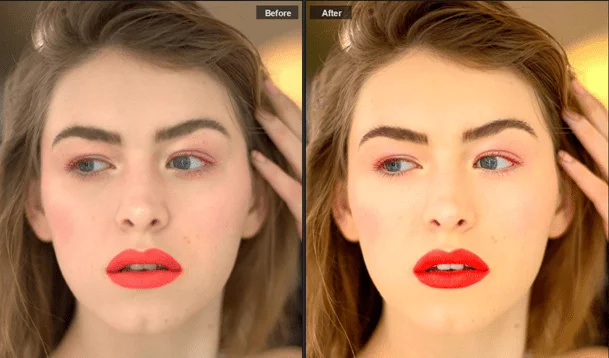
How to Edit RAW Images

Table of Contents

Toggle
  • What is the RAW File Format & Why Use Them?
    • Why Are Raw Images Needed & Used?
    • How to Edit Raw Images As a Beginner Without a Learning Curve

What is the RAW File Format & Why Use Them?

Once you have framed up your shot and hit the shutter button, light is going to flood your camera sensor so that the image can be recorded onto your memory card. When you have your camera set to take RAW images, the file that gets recorded is the from the image sensor of the camera.

A RAW image that you get is exactly what the sensor on your camera sees, with no compression present and minimally processed data. This is why RAW files are much larger than JPEG files and it is why they come out duller and bleaker than JPEG files, because the camera is not being asked to analyze the environments’ lighting, as no compression phase is present. This does mean that you must edit raw photos during post-processing, however, to get them to look stunning.

Why Are Raw Images Needed & Used?

1) You Keep All Data.

When you shoot images in JPEG format, a lot of processing occurs prior to the image being compressed by the camera. This makes it hard to go back and correct areas of the image you don’t like as the image is as close to the final product as possible.

Also Read: TunesGo Review: Transfer your iTunes media files without limits TunesGo Review: Transfer your iTunes media files without limits

With RAW images, you keep all of the image data, so you can easily go through the editing raw images process and manipulate it to suit your needs.

2) You Can Make White Balance Adjustments.

With RAW images you are going to get a much more natural and “close to reality” image when you adjust the white balance during post-processing.

3) You Get Finer Control Over Sharpness & Noise.

While your camera is okay in adjusting these, you will want to use an image editing tool to have complete control over how sharp your image is or how much noise you let through. This is especially true for images that are shot at night or where flash cannot be used.

4) You Can Manage Exposure Levels.

Modern cameras can adjust the details of highlights and shadows but you can get a clearer scene when you adjust the exposure levels in post-processing. This is a lot easier to do with RAW images than JPEG.

How to Edit Raw Images As a Beginner Without a Learning Curve

Instead of recommending a complicated program like Adobe Photoshop or Lightroom, which requires extensive knowledge of how to use them, we are going to suggest using PhotoWorks instead.

It is a powerful photo editor that utilizes artificial intelligence algorithms to help you get the image you want without requiring you to learn how to use in-depth tools. Here is how to edit RAW photos in PhotoWorks either with its automatic profile options or through manual manipulation.

1) How to Edit RAW Photos With PhotoWorks Automatic Profile Options.

PhotoWorks has this neat built-in feature that allows you to use special profiles to enhance photographs with a single mouse click. To use one of these profiles, simply launch the program and open up your RAW file. Choose either Default (if you want to manually edit), Auto Enhancement, Landscape, Portrait, Sunny Day, or Black and White. Hit apply.
Also Read: Understanding the Technology Used By 3D Modeling Companies Understanding the Technology Used By 3D Modeling Companies

Once the settings have been applied, you can make further adjustments with the enhancement tab by adjusting color, tone, and sharpness or you can use the auto correction to fix color and light with a single click. If this isn’t enough, consider moving over to the effects tab and applying a filter/photo effect.

Edit RAW Photos With PhotoWorks

2) How to Process Raw Images Manually With PhotoWorks.

If you find that your RAW image has more than a few minor problems with it, manual correction is the way to go.

  • In the Enhancement Tab, Adjust Tone & Color.

You can either choose to auto correct the color and lighting, or you can use the sliders to decrease highlights, increase shadows, and change up the clarity, saturation, and white/black levels. Take your time in playing with the sliders here as these can really make your scene come alive.

Auto correct the color and lighting

  • Remove Undesired Elements With the Composition Tab.

Whether you have geometrical distortions, an uneven horizon, or undesired elements within your scene, these can be fixed in the composition tab. Pick an aspect ratio from the menu and use the cropping tool to remove the unwanted portions.

Remove Undesired Elements

  • Use Graduated Filters to Retouch Your RAW Image.

In the retouch tab, you can improve your RAW image by using the graduated filters to increase or decrease saturation, whites, shadows, contrast, blacks, exposure, and highlights. You can also play around with the temperature, tint, and color hues as well.

Plus, if you are working with a portrait, you can use remove red eye and remove blemishes with the Portrait Magic option, Healing Brush, and Red Eye Removal tool.

Also Read: Top 10 Best Linux Music Player Apps Top 10 Best Linux Music Player Apps

While it is recommend that you use the image editing software that you are familiar with, if you are a beginner at editing raw images, PhotoWorks may work out better for you as it doesn’t require hours of learning in-depth tools.

The .360 file is a 360desktop 360-degree Desktop Photo file. Are you having problems opening a 360 file or just wondering what they contain? Here we explain what these files are used for and show you software that we know can open or otherwise handle your files.

cards
Powered by paypal
Follow on WhatsApp Follow on Telegram
Share. Facebook Twitter Pinterest LinkedIn Tumblr Telegram WhatsApp Copy Link
Previous ArticleHow To Improve Your Blog Website From Beginner to Advanced
Next Article 5 YouTube Ad Tactics to Scale Any Business
Michael Austin
  • Website
  • Facebook
  • X (Twitter)
  • Pinterest
  • Instagram
  • LinkedIn

Michael Austin is an expert writer who loves creating engaging and easy-to-understand content. With years of experience, he specializes in writing well-researched articles that inform, inspire, and entertain readers. His clear and simple writing style makes complex topics easy to grasp. Whether it's trending news, helpful guides, or expert insights, Michael’s content is designed to be valuable and SEO-friendly, ensuring it reaches the right audience. Stay connected for his latest articles!

Related Posts

Google’s Account Activity Features that Record Your All Google Products Activity

Unlock the Web! | Best Ways to Access Blocked Websites (Easy & Safe)

Top 15+ Best Hacking Movies Every Computer Lover Must Watch | Cyber Thrillers, Hackers & Tech Films

What Should You Know About Network Security?

Fast iOS Transfer & Flexible iPhone Files Manager: WinX MediaTrans

Fast Convert (4K) Video, Download Online Video with WinX HD Video Converter Deluxe

Leave A Reply

Subscribe to Blog via Email

Enter your email address to subscribe to this blog and receive notifications of new posts by email.

Join 42.3K other subscribers
Categories
Latest Posts

Environmental Costs Of Fast Fashion

11 Business Lessons from Narendra Modi [Brand]

Wang Xingyue Bio – Age, Height, Net Worth, Girlfriend, Best Dramas & Rising Star Story!

World’s Richest Famous College Dropouts Prove You Don’t Need A Degree

How a Failed Invention Can Also Lead to a Successful Invention

To Succeed At Anything, Trust Nothing, Test Everything

25 Best Inspirational Quotes for Entrepreneurs

Interview with Kulwant Nagi From BloggingCage

Do You Have What Does It Takes to be a CEO? [CEO Infographic]

Apzom Digital – Complete Digital Marketing Solutions for Maximum ROI & Business Growth

The content on this website is provided solely for educational and informational purposes. We do not promote, endorse, or deal in any products, services, or activities mentioned. While we strive to share accurate and up-to-date information, we make no warranties regarding completeness, reliability, or accuracy. Any action you take based on the information found here is strictly at your own risk, and we will not be liable for any losses or damages in connection with the use of our website.

DMCA.com Protection Status
Quick Links
Age Calculator
Angel Number Calculator
Case Converter
Sudoku Online
Word Counter
Love Calculator
Jack Doherty YouTuber
Snake Dream Meaning
Get Rid of Cockroaches
Indian Cricket Team Coaches
Best Volleyball Team Names
Useful Links
Number to Words
Period Calculator
Yes-No Picker Wheel
Demon Name Generator
Kingdom Name Generator
Harry Potter Name Generator
Daddy Yankee Biography
Crocodile Dream Meaning
Goa Budget Trip Guide
Maryse Mizanin WWE Diva
Best Cricket Team Names
Helpful Resources
Colors Name In English
Best Computer Brands
WhatsApp Web
Most Beautiful Beaches
Tesla Cybertruck Review
Richest Actors in the World
India Jarvis Actress
Cat Dream Meaning
Belmar Beach New Jersey
Aryna Sabalenka Tennis Superstar
Best WhatsApp Group Names
Explore More
Good Morning Handsome
Best English Songs of All Time
Cricket World Cup Winners
Ways to Say Rest In Peace
Britain’s Got Talent Winners
American Idol Winners
Dude Perfect Net Worth
Horse Dream Meaning
Ramakrishna Beach Visakhapatnam
Anastasia Potapova Tennis Star
Best Funny Team Names
Facebook X (Twitter) Instagram Pinterest YouTube Tumblr LinkedIn WhatsApp Telegram Threads RSS
  • About
  • Contact Us
  • Advertise With Us
  • Disclaimer
  • Privacy Policy
  • Terms & Conditions
  • Web Stories
Copyright © 2012-2026. JustWebWorld - All Rights Reserved. | Sitemap

Type above and press Enter to search. Press Esc to cancel.

×

👇 Bonus Reads for You 🎁

Utilising Social Media
Are You Utilising Social Media for Your Business?
Best Android Games
Top 10 Android Games for Game Lovers | Best Android Games
Promotion On TikTok
Promotion On TikTok: The Main How’s And Why’s That You Have To Keep In Your Head While Purchasing Certain Services
The Facebook Effect In The Business World
3 Ways that Facebook Has Impacted Business In the Past Decade