Close Menu
JustwebworldJustwebworld
  • Business
  • Food
  • Health
  • Lifestyle
  • Tech
  • Home
  • Travel
  • Culture
  • Money
  • People
  • Sports
  • Auto
  • Digital
  • Mind
  • Fashion
  • Gaming
  • Learn
Facebook X (Twitter) Instagram Pinterest YouTube LinkedIn WhatsApp Telegram
Friday, July 3
  • About Us
  • Contact Us
  • Advertise With Us
  • Disclaimer
  • Terms & Conditions
  • Privacy Policy
JustwebworldJustwebworld
  • Business
  • Food
  • Health
  • Lifestyle
  • Tech
  • Home
  • Travel
  • Culture
  • Money
  • People
  • Sports
  • Auto
  • Digital
  • Mind
  • Fashion
  • Gaming
  • Learn
JustwebworldJustwebworld
Home » Tech » Google Assistant Takes on Siri on the iOS Platform

Google Assistant Takes on Siri on the iOS Platform

Michael Austin Tech 4 Mins Read
Facebook Twitter LinkedIn Telegram Pinterest Reddit WhatsApp
Follow Us
WhatsApp Telegram

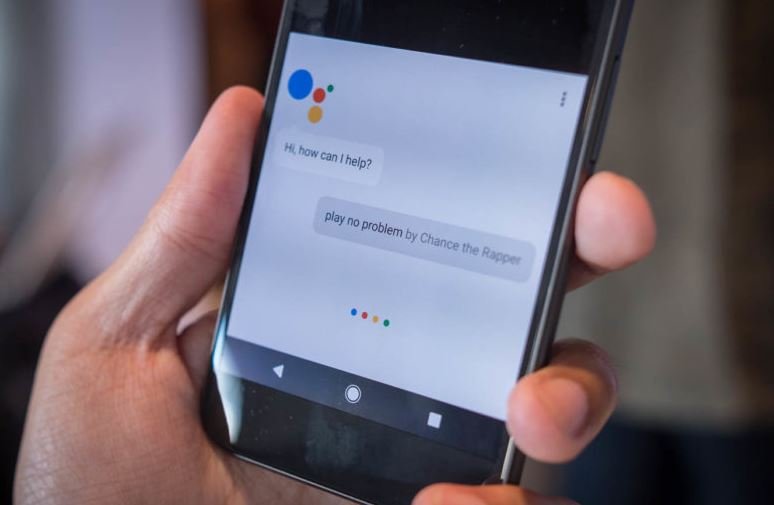
Google is on an upward trend to reach all people with its AI-assistant app. Soon after launching the Google Home in Australia, it announced the introduction of its Google Assistant on iOS. The Google Home is out to rival it out with Amazon Echo while the addition of Google Assistant on iOS pits it against Apple’s Siri.

Table of Contents

Toggle
  • Google Assistant on iPhone vs Siri
    • 1) First things first
    • 2) Asking a question
    • 3) More Options
    • 4) Settings
    • 5) Restrictions

Google Assistant on iPhone vs Siri

Google Assistant

Initially, Google Assistant OS app was only available in the US. Three months later, it has entered the UK market and is rapidly moving to the rest of the world. However, the multi-platform assistant meets numerous API restrictions on the iOS platform. It could not set alarms or be added on the home button to replace Siri. The only option is to add its widget. Google Assistant could only send iMessages and play music on Spotify.

With Google’s promise to improve the Assistant and add more integration, it is foreseen that Siri will soon be struggling to remain relevant on its own backyard. But just like Broadband Choices noted, it is too early to take sides on the supremacy battle between these two cutting edge assistants. For now, we look in details how you can use the Google Assistant on your iOS device.

Siri vs. Google Assistant on iPhone

1) First things first

First, visit Apple Store and download the Google Assistant app. It is available in the UK and the US. After signing into your Google account, allow the app to access your location and microphone. The Assistant then guides you to a chat screen with a list of things which you can ask it. Get your first experience with the assistant by asking, “What can you do?” In response, it will give you detailed information about itself and what it can do for you.

2) Asking a question

There are two ways of asking questions; a voice command or writing it down. For voice command, tap the microphone icon at the lower end of the chat screen as saying what you wish to know. Alternatively, you can touch the keyboard icon next to the microphone for and manually input your request.

3) More Options

Now that you already understand the basics, you can explore the other features of the Assistant. Tap the blue icon on the top right section of the screen to access more options. It will bring two tabs, Explore and Your Stuff.

Tap the Explore tab to find suggestions on what you can ask the assistant as well as recommended tie-ins. “Tie-in” is the Assistant’s unique way of referring to its abilities such as playing music in Spotify. Amazon’s Alexa and Microsoft’s Cortana refer to these as “Skills”.

Your Stuff is the place where Google Assistant arranges your personal plans, or stuff, such as reminders, shopping lists, and events among others. To add new details, tap the corresponding option.

4) Settings

You will automatically want to customize some of the features of the account to suit your preferences. Tap the blue icon for more options then select the three horizontal dots below the “Your Stuff” tab. You will find the Activity, Settings tabs together with other features.

“Activity” shows the history of all your past actions on the assistant. “Settings” tab allows you to manage your payment options, devices and services such as Spotify and Google Home.

5) Restrictions

On top of the already mentioned restrictions are more OS restrictions which limit the capability of the Assistant. It cannot command the launch of any app, including the camera. Even more, it cannot post on Facebook, Twitter or any other social network or launch third party messaging apps such as WhatsApp.

In spite of the restrictions, Google Assistant still has a few advantages over Siri. A notable one is its ability to remember the context. That is, it can correctly figure out related questions if they are asked one after the other. Siri, on the other hand, treats all questions independently. The Assistant is also very clear about its abilities, something Siri lets you figure out on your own. 🙂


cards
Powered by paypal
Follow on WhatsApp Follow on Telegram
Share. Facebook Twitter Pinterest LinkedIn Tumblr Telegram WhatsApp Copy Link
Previous Article5 Things You Should Buy along With a New Computer
Next Article Top Best Battery Saver Apps for Android 2017
Michael Austin
  • Website
  • Facebook
  • X (Twitter)
  • Pinterest
  • Instagram
  • LinkedIn

Michael Austin is the current owner of Justwebworld and manages the platform’s editorial direction, content strategy, and digital publishing operations. With a strong interest in online media and modern publishing, he focuses on creating informative, engaging, and easy-to-understand content across multiple categories. Under his leadership, Justwebworld continues to grow as a trusted multi-niche digital publication covering technology, business, lifestyle, automotive, sports, travel, and trending internet topics for readers worldwide.

Related Posts

How AI Website Builders Are Changing the Game for Local Small Businesses (2026)

Top UI/UX Design Agencies for SaaS Products in 2026

How to Choose the Right Mobile Recharge for Unlimited Data

The Cloud Control Gap: Why Enterprises Struggle to Balance Freedom and Standardization

HDMI Matrix for Conference Rooms: How to Route Multiple Sources to Multiple Displays

7 Best Providers of Legacy System Integration and API Transformation Services

Leave A Reply

Subscribe to Blog via Email

Enter your email address to subscribe to this blog and receive notifications of new posts by email.

Join 41.9K other subscribers
Categories
Latest Posts

8 Signs You Should Call An Emergency Plumber Immediately

8 Simple Ways to Modernise and Add Value to Your Commercial Property In 2021!

What Is Stock Analysis Tool: Overview, Types, Benefits & More

How Do Electricity Tariffs Work In South Australia and How to Choose the Best One

MasterChef India Winners List of All Seasons With Pictures

Top 15 Most Beautiful British Women and Celebrities

Top 15 Most Beautiful Colorful Birds From Around The World

Nine Best Alternate Ingredients For A Healthier Meal

Aamu Milonoff Biography: Age, Height, Boyfriend, Movies, Net Worth, Family & More (2026)

4 Things to Consider In Your Post-Covid Property Hunt

The content on this website is provided solely for educational and informational purposes. We do not promote, endorse, or deal in any products, services, or activities mentioned. While we strive to share accurate and up-to-date information, we make no warranties regarding completeness, reliability, or accuracy. Any action you take based on the information found here is strictly at your own risk, and we will not be liable for any losses or damages in connection with the use of our website.

DMCA.com Protection Status
Quick Links
Age Calculator
Angel Number Calculator
Case Converter
Sudoku Online
Word Counter
Love Calculator
Jack Doherty YouTuber
Snake Dream Meaning
Get Rid of Cockroaches
Indian Cricket Team Coaches
Best Volleyball Team Names
Useful Links
Number to Words
Period Calculator
Yes-No Picker Wheel
Demon Name Generator
Kingdom Name Generator
Harry Potter Name Generator
Daddy Yankee Biography
Crocodile Dream Meaning
Goa Budget Trip Guide
Maryse Mizanin WWE Diva
Best Cricket Team Names
Helpful Resources
Colors Name In English
Best Computer Brands
WhatsApp Web
Most Beautiful Beaches
Tesla Cybertruck Review
Richest Actors in the World
India Jarvis Actress
Cat Dream Meaning
Belmar Beach New Jersey
Aryna Sabalenka Tennis Superstar
Best WhatsApp Group Names
Explore More
Good Morning Handsome
Best English Songs of All Time
Cricket World Cup Winners
Ways to Say Rest In Peace
Britain’s Got Talent Winners
American Idol Winners
Dude Perfect Net Worth
Horse Dream Meaning
Ramakrishna Beach Visakhapatnam
Anastasia Potapova Tennis Star
Best Funny Team Names
Facebook X (Twitter) Instagram Pinterest YouTube Tumblr LinkedIn WhatsApp Telegram Threads RSS
  • About Us
  • Contact Us
  • Advertise With Us
  • Disclaimer
  • Privacy Policy
  • Terms & Conditions
  • Web Stories
Copyright © 2012-2026. JustWebWorld - All Rights Reserved. | Sitemap

Type above and press Enter to search. Press Esc to cancel.

−
×

📚 You May Also Enjoy

Discover a few more helpful articles selected for you 👇
Apple’s iCloud Activation lock status by Official iCloud Checker
Recommended
All About Apple’s iCloud Activation Lock Status by Official iCloud Checker
How to Increase Your Snapchat Score Fast
Recommended
How Can I Make My Snapchat Score Increase Faster?
How to Delete a Google Gmail Account
Recommended
How to Delete Gmail Account – Step By Step Guide
Thanks for reading JustWebWorld ❤️