Note (October 2026): Earlier versions of this article said HiPDF was English-only and entirely free. As of October 2026 the site is offered in 13 languages, free use has file and page limits, and paid plans are sold.
HiPDF is a browser-based PDF toolkit from Wondershare, the company behind PDFelement. It converts files to and from PDF (Word, Excel, PowerPoint, JPG and more), merges, splits, compresses, edits and signs PDFs, and adds AI tools such as Chat with PDF. As of October 2026, free use is limited to 20 MB and 100 pages per file; paid plans start at US$39.99 a year.
Key Takeaways
- HiPDF runs in any modern browser on Windows, macOS, Linux, Android and iPhone, with no software to install.
- Free users get limited access to most PDF and image tools: up to 5 files per batch, 20 MB per file and 100 pages per file, according to HiPDF’s pricing FAQ (October 2026).
- OCR for scanned documents is a paid feature; the Basic plan costs US$39.99 a year and the Advanced plan, which adds AI tools, US$69.99 a year.
- HiPDF says uploaded files are permanently deleted within 60 minutes after processing and lists ISO/IEC 27001 certification.
Gone are those days when you just had to hit your head on the file format that you received. When technology has been growing far and wide, why should we adjust the file format? With so many online tools available today, there’s no need to struggle with file formats that aren’t compatible with your needs. One great example of an online tool that can make your life easier is an Online compressor for pdfs.

Do you want to convert pdf to word? Or you want to move a word to be converted into a PPT? These days, everything is possible. Many of these conversions can now be done online, and several services, including HiPDF, offer a free tier with limits on file size and page count.
What is Hipdf all about?
Hipdf is an online PDF toolkit made by Wondershare, the company that also makes the PDFelement desktop editor. It converts files to and from PDF in a web browser, and its core tools can be used free of charge within usage limits. At Hipdf, you can convert your pdf file into any format that you would want to have it in. This is an online website, that can be accessed by anyone and everyone.
Once you land on their official page, you will be able to access the different options easily, as the options are very clear. Just click on the tile which you want to avail, and that’s all about it!
Apart from just converting your PDF into various formats, you can also avail the below features-
- Merging the PDFs: You can now have multiple PDFs into one single document using this feature.
- Splitting the PDFs into different portions: Have to divide your PDF into different pages and documents? Well, Hipdf allows you to do that, by using their splitting option.
- Compressing the PDF: You can reduce the size of your large PDF so that you are able to email it. HiPDF offers Low, Medium and High compression levels plus an exact-size option (for example 200 KB); stronger compression lowers image resolution, so check the result before sending it.
As of October 2026, the HiPDF site is offered in 13 languages: English, Arabic, Simplified Chinese, Traditional Chinese, French, German, Indonesian, Italian, Japanese, Korean, Portuguese, Spanish and Russian.
How to use Hipdf?
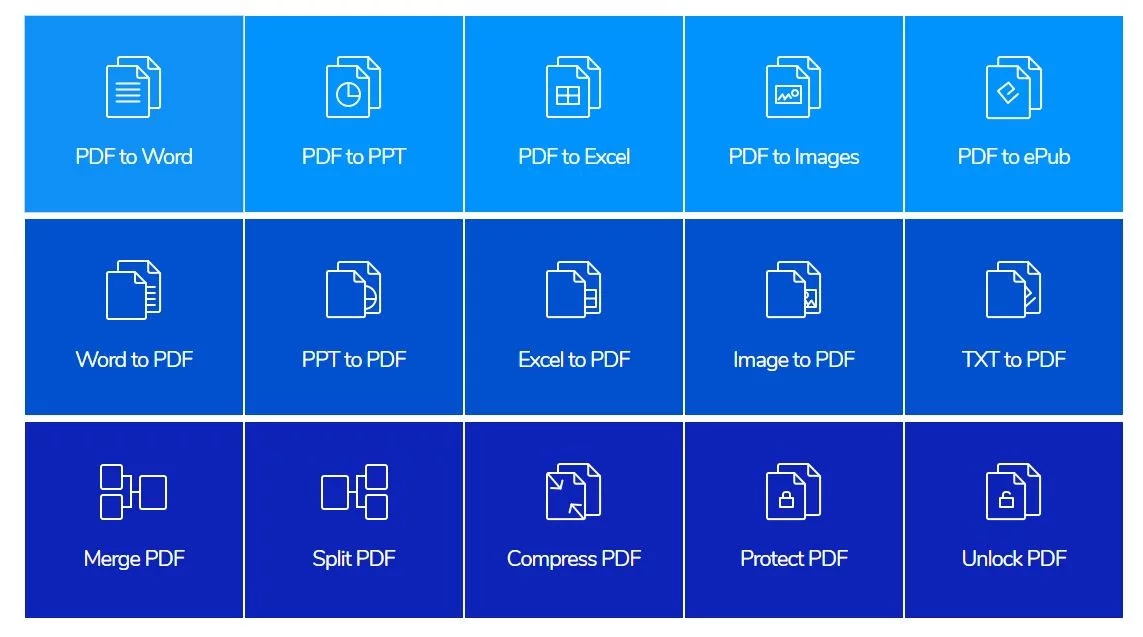
As mentioned above, you can use this website to convert your PDF into various formats.
How to convert PDF to the word?
- Go to the official page of Hipdf. You will find the option to convert pdf to word – click on that option.
- Upload your PDF by selecting it from your device or dragging it into the page, then click Convert.
- For a scanned PDF, use OCR and choose the document language so the text is recognized accurately (OCR requires a paid plan).
When conversion finishes, click Download to save the editable Word file to your device. HiPDF states that uploaded files are permanently deleted within 60 minutes after processing.
How to convert PDF to JPG with Hipdf
- On the homepage, you will have an option of ‘Convert PDF files to Images’ – select that.
- Once you click on that, you will be able to see multiple options –PDF to JPG, PDF to PNG, PDF to BMP, PDF to GIF, and PDF to TIFF.
- Choose the one you want and upload the file.
Click Convert; HiPDF says the conversion is completed in seconds, after which the image files can be downloaded.
How to merge multiple PDF files into one single PDF?
Apart from the conversion of PDF into various formats, you can also merge multiple PDFs into one. On the homepage, you will see an option of ‘Merge PDF’.
- Simply click on that and upload the files that you want to merge.
- Several files can be added and then dragged into the order you want them to appear.
- Once you upload all the pdf’s you will have an option of merge
- Click Merge and wait for HiPDF to combine the files. You will be able to download the merged file.
For heavier editing on a computer, desktop PDF editors are another option, such as Wondershare’s own PDFelement or SodaPDF, which is a separate product and not part of HiPDF. Overall, HiPDF covers most everyday conversion needs in one place. Basic tools are free within limits, while OCR, larger files and unlimited batch work require a paid plan.
What Can HiPDF Do?
HiPDF groups its tools into five areas. All of them run in a web browser, and HiPDF says they work on Windows, macOS and Linux and in major browsers including Chrome, Firefox, Safari and Opera.
| Tool group | Examples (as listed on HiPDF, October 2026) |
|---|---|
| Convert to PDF | Word, Excel, PPT, JPG, HTML and PUB to PDF |
| Convert from PDF | PDF to Word, Excel, PPT, HTML, JPG, PNG, BMP, GIF and TIFF |
| Organize | Merge, split, compress, rearrange pages, extract images |
| Edit and protect | Edit text, rotate, crop, sign, redact, password-protect, unlock |
| AI tools | Chat with PDF, AI PDF Translator, PDF Proofreader, AI Detector, AI Rewriter |
If you want to turn a web page into a PDF without uploading anything, see our guide on saving a webpage as a PDF.
Is HiPDF Free? Free Limits vs Paid Plans
HiPDF is free to use with limits. According to HiPDF’s pricing page (checked October 2026), free users get limited access to most PDF and image tools but no OCR, batch processing beyond 5 files or page-range selection, and files are capped at 20 MB and 100 pages each.
| Feature | Free | Basic plan | Advanced plan |
|---|---|---|---|
| Price (October 2026) | US$0 | US$39.99 per year | US$69.99 per year |
| Maximum file size | 20 MB | 100 MB | 100 MB |
| Maximum pages per file | 100 | 2,000 | 2,000 |
| Batch processing | Up to 5 files | No limit | No limit |
| OCR | No | Yes | Yes |
| Chat with PDF and AI Read | 50 questions in total | 50 uses | 1,000 uses |
HiPDF also sells 7-day access passes (US$0.99 for Basic and US$1.99 for Advanced as of October 2026) that automatically renew into the yearly plan unless cancelled, and a separate AI-only monthly plan at US$3.99. Wondershare offers a 30-day money-back guarantee under its refund policy. Prices change often, so check the official pricing page before buying.
How to Compress a PDF With HiPDF
- Open the Compress PDF tool and upload the PDF.
- Choose a compression level (Low, Medium or High) or enter a target size such as 200 KB or 1 MB.
- Click Compress, then download the smaller file.
According to HiPDF, its strongest Hyper Compression option works by lowering image resolution and removing unnecessary data, so a PDF made of photos shrinks far more than a text-only one. Our explainer on lossy vs lossless image compression covers why quality can drop.
Is HiPDF Safe to Use?
HiPDF states that all uploaded files are permanently deleted within 60 minutes after processing, that files are encrypted during upload, and that it is a member of the PDF Association with ISO/IEC 27001 and SSI SECURE certifications. Any online converter still means sending your document to a third-party server, so avoid uploading highly sensitive files such as tax records or ID documents, or use a desktop tool instead. For locking files before sharing, see how to encrypt a PDF document.
HiPDF vs a Desktop PDF Editor
An online tool like HiPDF suits quick, occasional jobs on any device. A desktop editor suits frequent work, large or confidential files, and offline use; HiPDF points users who need offline access to Wondershare’s PDFelement desktop app. Our Wondershare PDFelement guide covers that option, and our checklist of what to consider when choosing a PDF converter helps compare alternatives. If you only need to change text, see how to edit a PDF file online.
Frequently Asked Questions
Who owns HiPDF?
HiPDF is a Wondershare product. Wondershare lists it alongside PDFelement among its PDF products, and the HiPDF site carries Wondershare’s copyright notice.
Is HiPDF completely free?
HiPDF is not completely free. As of October 2026, free users can use most tools within limits of 20 MB and 100 pages per file, while OCR and unlimited batch processing need a paid plan starting at US$39.99 a year.
Do I need to sign up to use HiPDF?
HiPDF advertises its PDF to Word converter as free with no sign-up. Higher limits and premium features require an account and a paid plan.
Can HiPDF convert scanned PDFs to Word?
HiPDF can convert scanned PDFs to editable Word, Excel, PPT and EPUB files using OCR, but its pricing page lists OCR as a feature free users cannot access.
How long does HiPDF keep my files?
HiPDF states that all uploaded files are permanently deleted within 60 minutes after processing.
Does HiPDF work on a phone?
HiPDF works in a mobile browser on Android and iPhone, and the site also promotes a free app for editing PDFs.